Visual content, especially the carousel format, is an excellent strategy for communicating on social media, particularly on Instagram, TikTok, and LinkedIn. Among other things, they allow for breaking down complex concepts in an educational and engaging way.
The problem? Creating these visuals takes forever.
Spending hours on a design tool to create each slide, adjust margins, and align every element to the nearest pixel eventually discouraged me. Result: I wasn't posting consistently anymore.
Just like I did to optimize images with my ANVL tool: I developed my own custom AI image generator to automate the creation of images for my social media posts.
1. The Concept: From Idea to Visual Without Friction
The goal was simple: eliminate the tedious phase of manual layout.
Rather than starting from a blank page every time, my tool works based on a "visual prompt" principle and automates image generation. For each slide of my carousel, I specify:
- The text to display (the key message).
- Reference images to define style and context.
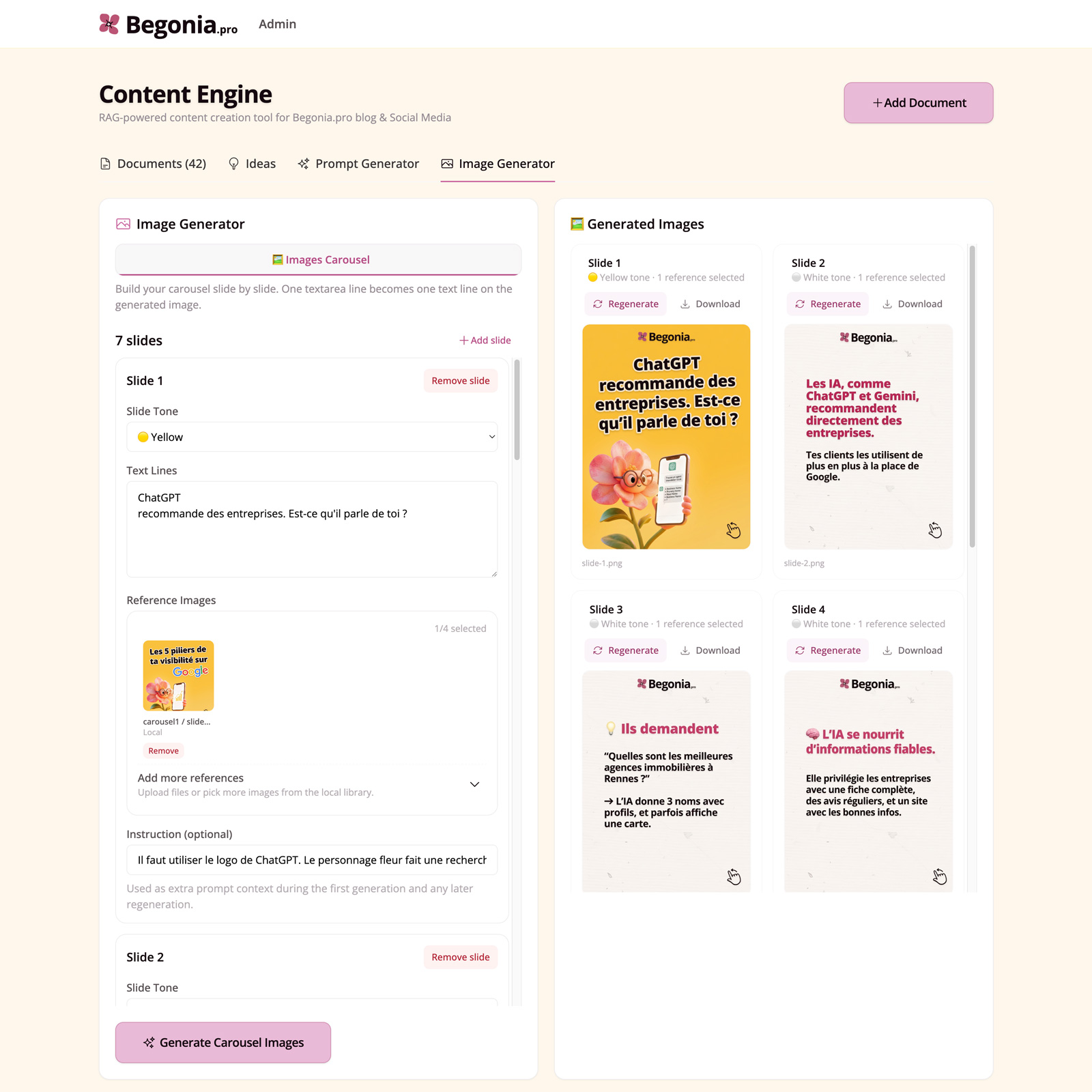
The AI then handles the rest: it generates the background image while directly integrating the text harmoniously. If the result doesn't suit me at first, a simple prompt allows me to refine the visual until I get the desired outcome.
2. A Massive Time-Saver for Begonia.pro
I use this tool to feed the accounts of Begonia.pro, my Local SEO SaaS. For a SaaS tool, publishing regularly on social media is crucial, and posting practical tips on local SEO resonates with my target audience: artisans and local businesses.
What used to take me several hours of design is now done in a few clicks. It's stunning to see the AI capture the reference image and manage to change the text, and even the illustrations, while maintaining exactly the same graphic style.
3. System Limitations: Accepting Imperfection
As I mentioned in my Lovable review, AI isn't perfect yet, and some compromises must be accepted:
- Typographic precision: You shouldn't be too obsessed with the exact pixel-perfect size of the text.
- Logo placement: The AI doesn't exactly respect the placement from the original images. For a carousel, this results in small alignment shifts between slides.
- Style: You can quickly fall into "AI Slop" syndrome if you don't guide the tool precisely enough with high-quality reference images.
But let's be realistic: for social media use, where consistency and relevance of the message matter more than aesthetic perfection, the ratio of time invested to impact generated is simply unbeatable.
So, I've set aside my perfectionism regarding element placement, which I used to strictly follow when creating images manually (which explains why it took me so much time...), in favor of this new workflow that lets me generate my carousels in a few clicks while drinking my coffee.
Conclusion
By automating image creation—a vital but often thankless part of content strategy—I've been able to increase my posting frequency without it becoming a logistical chore. This is yet another proof that AI, when used for a specific business need, is an incredible productivity lever.
This era is wonderful for anyone who loves creating digital projects. You can design tools, websites, images, videos, music, code, etc., in just a few clicks. My "Builder" soul loves it!
And you, which aspect of content creation takes up most of your time? Would you be willing to let an AI handle your visuals at the cost of some imperfections?
📌 Do you want to create your own tools to automate repetitive tasks and take advantage of the new possibilities offered by AI? Discover my Product Engineering services to design and develop your custom tools.